How to Create a Facebook Store Step by Step for Ecommerce
With millions of active users every day, Facebook has established itself as a key platform for increasing the visibility and sales of any business. Imagine showcasing your products directly to millions of people in an environment where customers already spend much of their time. Having a store

With millions of active users every day, Facebook has established itself as a key platform for increasing the visibility and sales of any business. Imagine showcasing your products directly to millions of people in an environment where customers already spend much of their time.
Having a Facebook store makes exactly that possible by integrating your products into the world’s most widely used social network. For small, medium, and large businesses, this is a unique opportunity. Small businesses can set up their store quickly and affordably, medium-sized businesses can segment ads and optimize their marketing strategies, and large businesses can complement their existing ecommerce platforms.
Set up your Facebook store and start enjoying the benefits of being present on one of the world’s most powerful social networks.

Why have a Facebook store?
Facebook is not only a social network, but also a powerful ecommerce platform. By creating a store on this network, businesses can present their products directly to millions of active users, making interaction and the buying process easier. In addition, a Facebook store allows businesses to take advantage of social marketing, which can translate into a significant increase in sales.
The ability to integrate the store with other platforms and use advanced analytics and ad targeting tools makes managing a Facebook store both efficient and profitable.
Advantages for businesses of different sizes
The advantages of having a Facebook store extend to businesses of all sizes.
For small businesses, it is an affordable and fast way to establish an online presence. With the use of commerce manager, even the smallest businesses can manage their catalog and sales without major investments.
Medium-sized businesses can take advantage of advanced ad targeting and data analytics features to optimize their marketing strategies and reach specific audiences.
Large businesses, meanwhile, can integrate their ecommerce and digital marketing operations, using Facebook as an additional sales and promotion channel that complements their other platforms. In addition, integration with Instagram expands the possibilities even further, making it possible to create a cohesive and appealing shopping experience.
Page manager and data analytics tools provide valuable insights to continuously improve the offering and better satisfy customers.

Initial preparations: What you need to get started
It is essential to understand the requirements and preparations needed to create a Facebook store. The process not only involves creating your store through the Facebook page, but also making sure you have a properly configured business manager.
With this setup, businesses can manage their stores efficiently, integrating catalogs choosing suitable products in an organized way. In addition, it is crucial to have an active business account, which will allow access to all the tools and options needed to set up and manage the Facebook store.
Prerequisites: Facebook Page and business manager
Before you begin, it is essential to have a well-configured Facebook Page. This page will be the digital storefront where customers can view and buy your products. Along with the page, you need to set up a business manager, a powerful tool that allows you to manage catalogs, users, and permissions.
The manager is vital for keeping information organized and ensuring that all aspects of the store work properly. Creating a business account is the first step in this process, making it easier to access all the configuration and administration options needed for a successful online store.
Benefits of integrating a Facebook store with other ecommerce platforms
- Product catalog synchronization.
- Efficient inventory management.
- Optimized purchase processing.
- Expanded reach through connection with Meta and Instagram.
- Increased sales through analytics tools and personalized ads.
- Improved customer experience.
- Optimization of business operations.
- A more complete view of the business for strategic decisions.

Step by step to create a Facebook store
When we think about how to create a Facebook store, it may seem like a complicated process, but by following these steps, you can have your store up and running in no time and use all the benefits of Meta:
Step 1: Initial setup
The first step to creating a Facebook store is to carry out the initial setup. To do this, you will need a well-established Facebook Page, as this will serve as the foundation of your online store. Make sure your account is set up as a business account, which will give you access to all the tools and options needed to manage your store.
Accessing sales manager
Once you have your Facebook Page and business account set up, the next step is to access the sales manager, also known as commerce manager. This tool will allow you to manage all aspects of your store, from creating catalogs to setting up products and prices. To access the sales manager, go to the settings section of your page and select the corresponding option.
Create or integrate an existing store
Now it is time to create your store or integrate an existing one. If you already have a store on another ecommerce platform, you can integrate it with your Facebook store to keep your catalogs and products synchronized. If not, you can create your store from scratch using the tools provided by commerce manager.
Understand catalog creation, product uploads, and the setup of payment and shipping options. Make sure to provide all the necessary information and configure your Facebook store so that it is easy for your customers to navigate.
By following these steps, you will be on your way to setting up a fully functional Facebook store ready to attract new customers and increase your sales.

Step 2: Select a checkout method
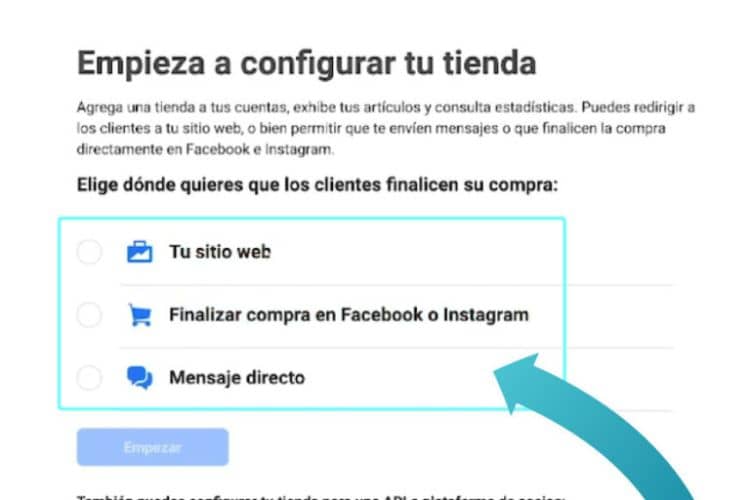
One of the most important decisions when creating a Facebook store is selecting the checkout method you will offer your customers. Facebook lets you choose between three main methods, each tailored to different needs and preferences for both businesses and customers.
Checkout on another website
This allows you to redirect customers to your own website to complete the purchase. It is ideal for businesses that already have an established online store and prefer to handle payment and shipping through their own platform.
To set up this method, you simply need to provide the link for each product to the corresponding page on your website. Customers will click on the product in your Facebook store and be taken directly to your website to complete the order.
Checkout on Facebook or Instagram
Allowing customers to complete the purchase directly on Facebook or Instagram can significantly improve the user experience and increase conversions. With this method, customers do not need to leave the platform to complete their purchases.
The entire process, from product selection to payment, takes place within Facebook or Instagram. It requires setting up your commerce account, adding products to your catalog, and configuring payment and shipping options.
Checkout with message
The checkout with message option allows customers to contact you directly through Facebook Messenger to complete the process. It is ideal for growing businesses that require more personalized communication or that sell products needing more explanation before purchase. Customers can send a message from the product page in your Facebook store, and you can provide them with any additional information they need and coordinate the final details online.
Selecting the right checkout method for your Facebook store depends on your specific needs and the experience you want to offer.
Step 3: Add products to the catalog
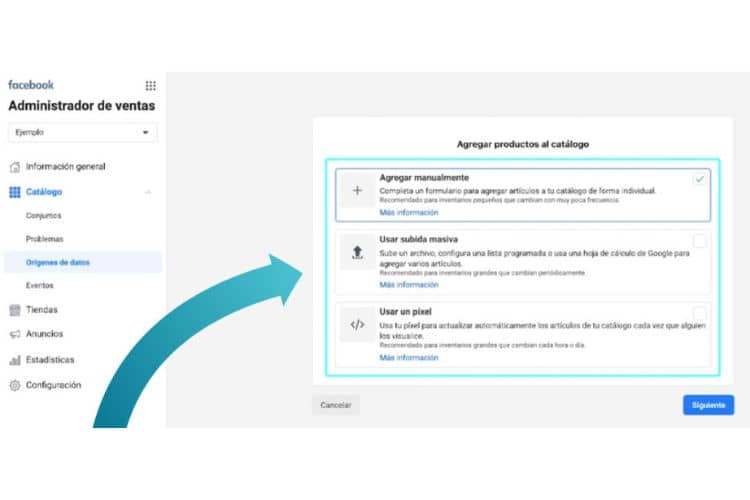
To have a complete and functional Facebook store, it is essential to add products to the catalog. The process can be done in different ways, depending on the size and needs of your business.
Manual upload
Manual upload is ideal for businesses with a small number of products. To add them manually, go to the catalog section in your manager account. Then select the option to add products manually and fill in the required information for each product, including the name, description, price, and images. It is simple and straightforward, allowing detailed control over each individual item in your Facebook store.
Bulk upload using CSV, TSV, or XML
For businesses with a larger inventory, bulk product upload using CSV, TSV, or XML files is an efficient option. First, prepare a file with all the details following the format specifications provided by Facebook. Then upload this file to your catalog in the manager. It saves time by allowing multiple listings to be uploaded at once and ensures that all information is properly organized and up to date.
Synchronization with the Facebook pixel
Another option for adding products to the catalog is synchronization through the Facebook pixel. It is especially useful for businesses that already have a website or ecommerce page. By integrating the Facebook pixel with your online store, products are automatically synchronized with your catalog. This not only simplifies inventory management, but also ensures that product information is always up to date on both platforms.
All methods for adding products to the catalog allow businesses to create a well-organized and attractive Facebook store for customers, making navigation easier and improving the shopping experience.
Step 4: Review and submit the store for review
Once you have configured all aspects of your Facebook store, it is crucial to review all the details before submitting it for review. Make sure that all items in your catalog are correctly listed with accurate and complete information. Verify that the images, descriptions, and prices are correct.
Also, make sure your account and page settings are in order, and that you have selected the appropriate sales channels. Once everything has been reviewed, you can proceed to submit your store for review. Facebook will review your store to ensure it complies with its policies and requirements before approving it.
Confirmation of administrators and sales channels
To ensure efficient management when setting up a store, it is necessary to confirm the administrators and sales channels. In the settings section of your account, you can assign administrators who will have access to manage the catalog and sales. Make sure to grant the appropriate permissions to each administrator. In addition, select and confirm the sales channels through which you will offer your items, such as Facebook and Instagram.
Confirmation is essential for your store to function smoothly and in an organized way, allowing better management of products and user interactions.
Acceptance of merchant agreements
Before your store can start operating, you must accept the merchant agreements established by Facebook. The agreements include terms and conditions that govern the use of the social network for selling products. Read the agreements carefully to make sure you understand all responsibilities and requirements. Once you agree, accept the terms and conditions on the platform.
It is a crucial step to ensure that your stores comply with all regulations and are ready to start selling on Facebook, offering a safe and reliable experience for both you and your audience.

Store optimization
When your Facebook store is up and running, it is crucial to optimize it to ensure it is offering the best possible experience to your customers. Store optimization not only improves the user experience, but can also increase your sales and customer satisfaction, bringing you closer to your financial independence.
Importance of keeping the catalog updated
Keeping the catalog updated is essential for the success of your Facebook store. Make sure that all products listed in your catalog have the latest information, including availability, prices, and descriptions according to your market niche.
A well-managed and updated catalog not only makes navigation easier, but also improves the visibility of your items in the marketplace. In addition, an updated catalog helps avoid inventory problems and ensures that customers always see the real offer of items available in your store.
Using high-quality images and detailed descriptions
High-quality images and detailed product descriptions are essential to attract and retain users to your online store. Clear and appealing images allow customers to see products in detail, which is crucial for decision-making. Accompany the images with detailed descriptions that include all relevant information about the product, such as features, materials, dimensions, and benefits.
Taking care with the level of detail not only helps people make informed decisions, but can also reduce return rates and increase customer satisfaction.
Performance analysis and tracking with Facebook tools
To optimize and scale your Facebook stores, it is important to use the analytics and performance tracking tools that the platform offers, as they allow you to monitor how your products are performing, understand customer behavior, and adjust your strategies accordingly.
Use this data to identify which products are most popular, which need more promotion, and where you can improve the user experience. Continuous analysis and performance tracking help you keep your stores competitive and aligned with the needs and preferences of your audience on both Facebook and Instagram when you start learning how to create a Facebook store.

Additional tips to perfect stores on the world’s most popular social network
Collection customization
Group products into themed collections to make searching easier and increase sales.
Facebook and Instagram integration
Connect your store with Instagram to reach more users and sell directly from this social network.
Improving the visual experience for mobile devices
Optimize your store for mobile devices, ensuring that the images and design are attractive and functional.
Communication through WhatsApp Business
Use WhatsApp Business to offer fast, personalized customer support, improving your relationship with buyers.
Implementing SEO in product descriptions
Incorporate keywords into your product descriptions to improve visibility in search engines and attract more customers.

Conclusion: Facebook, one of the best tools for participating in ecommerce
When thinking about how to create a Facebook store and optimize it, it is crucial to apply effective strategies to ensure success in ecommerce. Keeping an updated catalog and using high-quality images and detailed descriptions for posts not only attracts more customers, but also improves the shopping experience.
Integration with Instagram and the use of Facebook analytics tools are essential for monitoring performance and adjusting strategies in real time. Facebook and Meta can also be a powerful gateway to ecommerce, where adaptability and continuous learning are key to maximizing their capabilities and ultimately increasing the efficiency and value of your online business.